

We're excited to share the latest enhancements to your Guest Travel and Expense platform.
This release makes events easier to run as a team, with co-managed events and a clear approval workflow, and a single Events dashboard for budget, spend and guest progress. A payment method for each cost category and a range of other improvements help deliver a smoother Guest T&E experience.
Explore the full release note below for complete details.
Key enhancements
Run events together, without admin rights
Event ownership and collaborative access let any employee create and co-manage events without Admin rights, so events are organized by the people closest to them and without access to company account data. Each event can now have several co-owners.
Event creators submit an event for approval. An Admin or approver delegate reviews it, and events that use virtual Cards as a payment method go to Funding approver delegates. Rejected events come back with a reason. A new Event Authorizations page shows what is waiting on you, what is waiting on others and what is ready or open, and dedicated emails keep everyone informed. Admins get fewer requests, and approvals stay under control.
To learn more about event approval, see our guides Approve or Reject an Event and Events made simple.
Follow budget, spend and guests from one Events dashboard
The Events dashboard is now the place to see how a launched event is tracking. Planned and actual spend appear side by side, with the total event budget by defined scope, next to each guest's RSVP status, profile completion and booking progress, the event timeline and key details, the invitation link and a summary of the event travel policy.
Budget and guest progress now sit on the same screen, so event managers can tell at a glance whether an event is on track on both fronts. When a guest needs attention, the dashboard links straight to Guest Hub, where you can view, edit and manage individual guests. Less switching between screens, and earlier action on what is holding an event back.
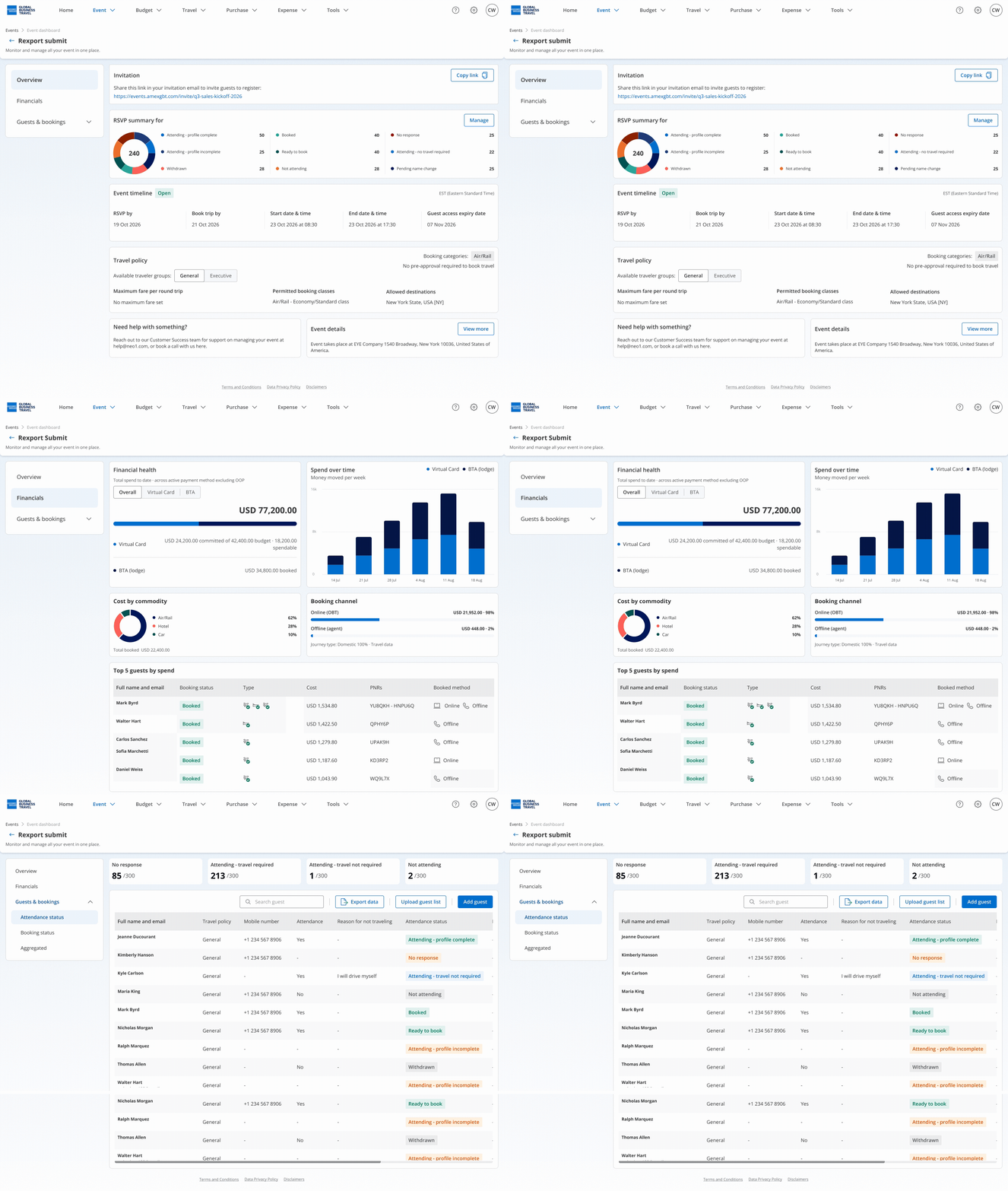
To learn more about tracking your events, see our guides Manage and monitor your event and Guest Hub.
Product updates
Choose the payment method for each cost category
Role
Event managers
Value
Pay for each cost category of an event with the method that fits it.
Description
Event managers can now decide how each travel commodity is paid, by selecting a payment method for each cost category instead of one for the whole event. Air and rail can use BTA, a shared company card, a virtual Card or out-of-pocket payment, while hotel, car and ground transport can use a virtual Card or out-of-pocket payment. For air and rail, the default follows the order BTA, shared company card, then virtual Card, with out-of-pocket as the fallback.
To learn more about payment methods for your events, see our guide Create an Event.
Personal cards can be shared with event guests
Role
Event managers
Value
Allow guests to book with a card chosen by the event manager.
Description
Event managers can attach a personal card, from any bank, to an event and pass it on to its guests for booking. The card is displayed masked in the event details and is removed automatically if they lose management rights on the event.
Events can be launched immediately
Role
Event managers
Value
Open registration as soon as an event is created.
Description
The event start date, RSVP by date and Book by date can now fall on the same day. The event start date itself must still be at least three days away.
To learn more about creating and launching an event, see our guide Create an Event.
A simpler event creation flow
Role
Event managers
Value
Set up events with fewer settings and resume drafts where you left off.
Description
Allowed destinations are now set once for the whole event, instead of separately for executives and general employees, and events not yet launched were merged so no destination is lost. Each creation step is also saved as you confirm it.
To learn more about creating an event, see our guide Create an Event.
RSVP questions can be skipped
Role
Event managers, guests
Value
Take guests straight to profile creation when their attendance is already settled.
Description
Event managers can set RSVP status and need to book to yes in advance. Guests arriving through their unique event invitation link then go directly to setting a password and creating their profile.
To learn more about event RSVP links, see our guide View your event RSVP link.
Guest names can be amended
Role
Event managers, guests
Value
Keep guest records accurate when a name needs to be corrected.
Description
First and last names can now be amended directly on guest profiles.
Account delegation to several people
Role
Admins, account holders
Value
Delegate an account to several people for the same period.
Description
Users can now delegate their account to more than one person at a time, which supports teams managing a large number of virtual Cards.
To learn more about account delegations, see our guide Working with Account Delegations.
Sender name on platform emails
Role
All users
Value
Identify platform emails more easily.
Description
Emails sent by the platform, such as password resets, now display a sender name instead of a bare email address, making them easier to recognize and trust.
Start date for loyalty cards
Role
Guests, Admins
Value
Record loyalty cards that require a start date.
Description
An optional start date field is now available when adding a loyalty card, from People management and from the user profile.
To learn more about managing user profiles, see our guide Managing User Profiles.
Additional improvements
- Improved event approval and ownership handling, including virtual Card payment delegations, the authorization banner and rejected events.
- Smoother Ready event management, including launch option changes, event deletion and events using a virtual Card when the finance step has not been saved.
- Better date and validation handling on events, including rejected event dates, RSVP and Book by messages, RSVP screen wording and early arrival details.
- More consistent event financials, including payment methods on the dashboard, graphs for non-admin event managers and inactive payment methods.
- Applied the financial fields hidden in company settings to the event creation screen, as on transactions.
- Improved event manager and guest handling, including personal cards and SMS status on new events.
- Improved health and compliance profile screens, and clearer wording in Australian company onboarding.
- More consistent transaction and expense handling, including recipient authorization, mileage ratings, budget shortcuts and the removal of a duplicate BTA data feed in company settings.
- Cleaner display across modals, checkboxes, labels, menus and dashboard icons.
- Redirected knowledge base links to the knowledge base homepage.
Our aim is to keep improving everything we do to provide a great experience to our customers; as always, any and all feedback is welcome, simply contact us at help@amexgbtone.com.